Track workouts
Log your treadmill sessions with accurate, reliable data.
Workout tracking for treadmill desks. Accurate effort — no arm swinging required. Just keep working.
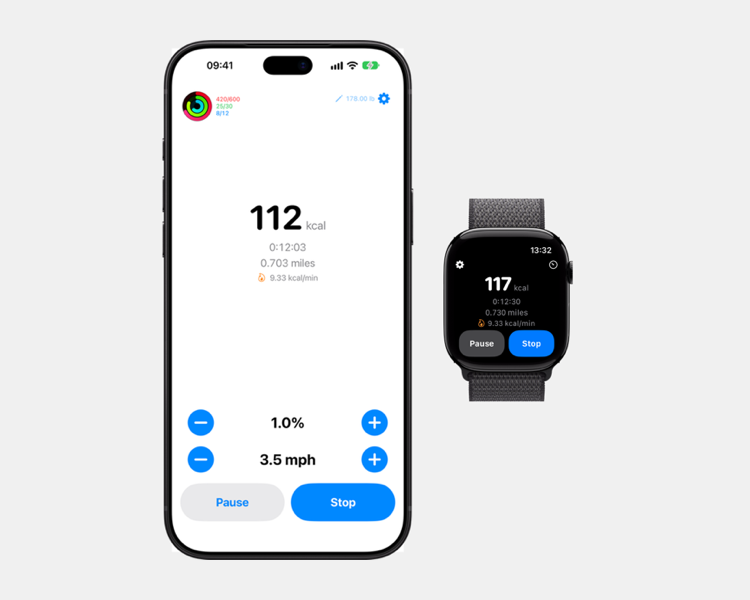
Are you tired of working at your treadmill desk and your watch says you haven't even started to burn those calories? Swingless solves this problem. Set your speed and incline and start working. When you're done your workout is synced and you can close those rings while you work.
Log your treadmill sessions with accurate, reliable data.
Monitor your rings right in the app, without breaking focus on your work.
Your workouts count toward your daily activity and close your rings.
See your workout on your Mac, phone notch, or lock screen.
A full featured, dedicated watch app. You pick where to do the workout.
Your preferences are shared across phone and watch.
Knows a run from a walk based on your speed.
Works with incline treadmills, not just flat belts.
Tired of the Apple Workout app all but ignoring your effort for your Indoor Walk/Run while your arms are busy typing?
You set your treadmill pace and incline then start a workout. If you change speed just tap the button. When you're done you get accurate calorie burn, distance and time, all without needing to swing your arms.
Yes. Swingless works with incline treadmills, so uphill walks and runs are captured too. Swingless includes the incline in the calculations so you get real data.
Swingless runs on iPhone and Apple Watch. Use them interchangably. Change a setting on the watch and the phone knows about it. Even see a live activity on your Mac to monitor your progress.
Swingless will resume an active workout when you return to the app.
No. Your heart rate is not considered. Most importantly you can type or continue using your hands instead of swinging with a walking or running gesture just to get the workout counted.
Yes. You could. You could also just go into the health app and add a workout manually. Its your data and your fitness journey. We like to think you can trust yourself.
Yes. Swingless writes your workouts to HealthKit so they count toward your daily activity and rings. If you would prefer not to include Swingless workouts in your Health data it can be turned off.
Your workout data stays on your devices and in your iCloud account; we don't sell or share it.
The app will request to read your weight and see your activity rings. It will write your workout stats to the Health App. Apple requires we request permission before doing any of this so we have to ask. It's all optional and can be refused. If you prefer, you can enter your weight manually and not record to the Health app. The app will work either way.
None. Zip. Zilch. Our Privacy Policy is here.